Running a home service business means juggling schedules, invoices, calls, and dispatch at once. Most teams either drown in admin or lose jobs to unanswered calls.
Jobber is a field service platform that solves the admin side. G2 users report saving 40 hours/month on admin. But missed inbound calls remain the top complaint. This guide covers what Jobber does well and where it falls short.
Key Takeaways
Jobber is a field service management platform for home service businesses handling scheduling, dispatching, invoicing, and customer communication
Its Jobber scheduling software reduces double bookings, dispatcher confusion, and manual admin work
Jobber customer service workflows handle reminders, quote approvals, and job updates automatically
Jobber call management does not fully cover after-hours or overflow inbound calls
Adding an AI answering service integrated with Jobber closes that communication gap 24/7
What Is Jobber Software?
Jobber is a cloud-based field service management platform designed for home service businesses.
It brings scheduling, dispatching, invoicing, payments, and customer communication into one centralized dashboard, replacing the spreadsheets, sticky notes, and separate apps most small service teams rely on.
Understanding how to use Jobber for a service business starts with knowing which operational problems it actually solves and where it still needs support from other tools.
Jobber is commonly used by:
HVAC and plumbing companies
Electricians and restoration contractors
Cleaning services and landscapers
Pest control businesses
Core features include:
Scheduling and dispatching — Assign jobs, adjust technician schedules, and track appointments in real time
Invoicing and payments — Send invoices automatically, accept online payments, and track outstanding balances
Jobber customer service workflows — Appointment reminders, quote approvals, job updates, and follow-up communication
Mobile access — Technicians access customer details, job notes, and schedules from any device in the field
How Jobber Improves Customer Scheduling and Workflow Management
Before Jobber, most home service businesses run scheduling on whiteboards, phone calls, and shared spreadsheets. Jobs get double-booked. Technicians show up without the right information. Invoices go out late.
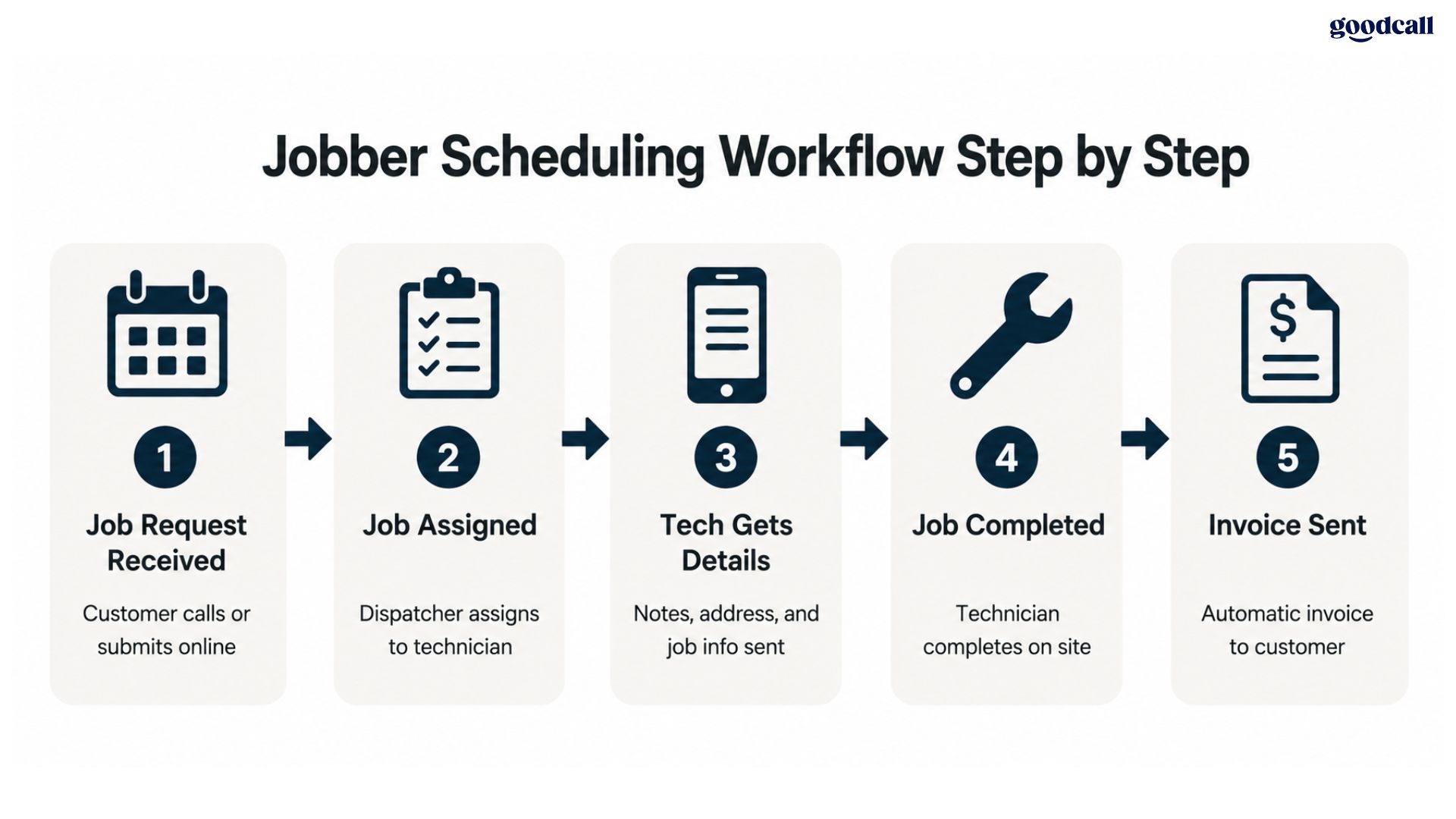
Jobber scheduling software replaces that chaos with a single, visible system your whole team works from.
Faster scheduling adjustments:
Adjust last-minute cancellations and emergency requests without spreadsheets
Track technician status and optimize routes in real time
Reduce dispatcher downtime through smarter job assignment
Better technician coordination:
Share customer details, job notes, and access instructions directly to mobile devices
Monitor field team progress from one dashboard without calling each technician
Reduce arrival errors and repeat callbacks caused by missing job information
Automated customer updates:
Send appointment reminders, arrival notifications, and invoice updates automatically
Collect quote approvals and payment confirmations without manual follow-up
Reduce no-shows through structured pre-visit communication
Stronger workflow visibility:
Monitor open jobs, technician schedules, and outstanding invoices in one view
Identify scheduling bottlenecks before they slow your team down
Jobber gives your service business operational control that manual coordination cannot sustain as you grow.
Common Challenges Businesses Still Face While Using Jobber
Jobber solves a real problem for service businesses. But even well-organized Jobber users run into communication bottlenecks that the platform was not designed to address.
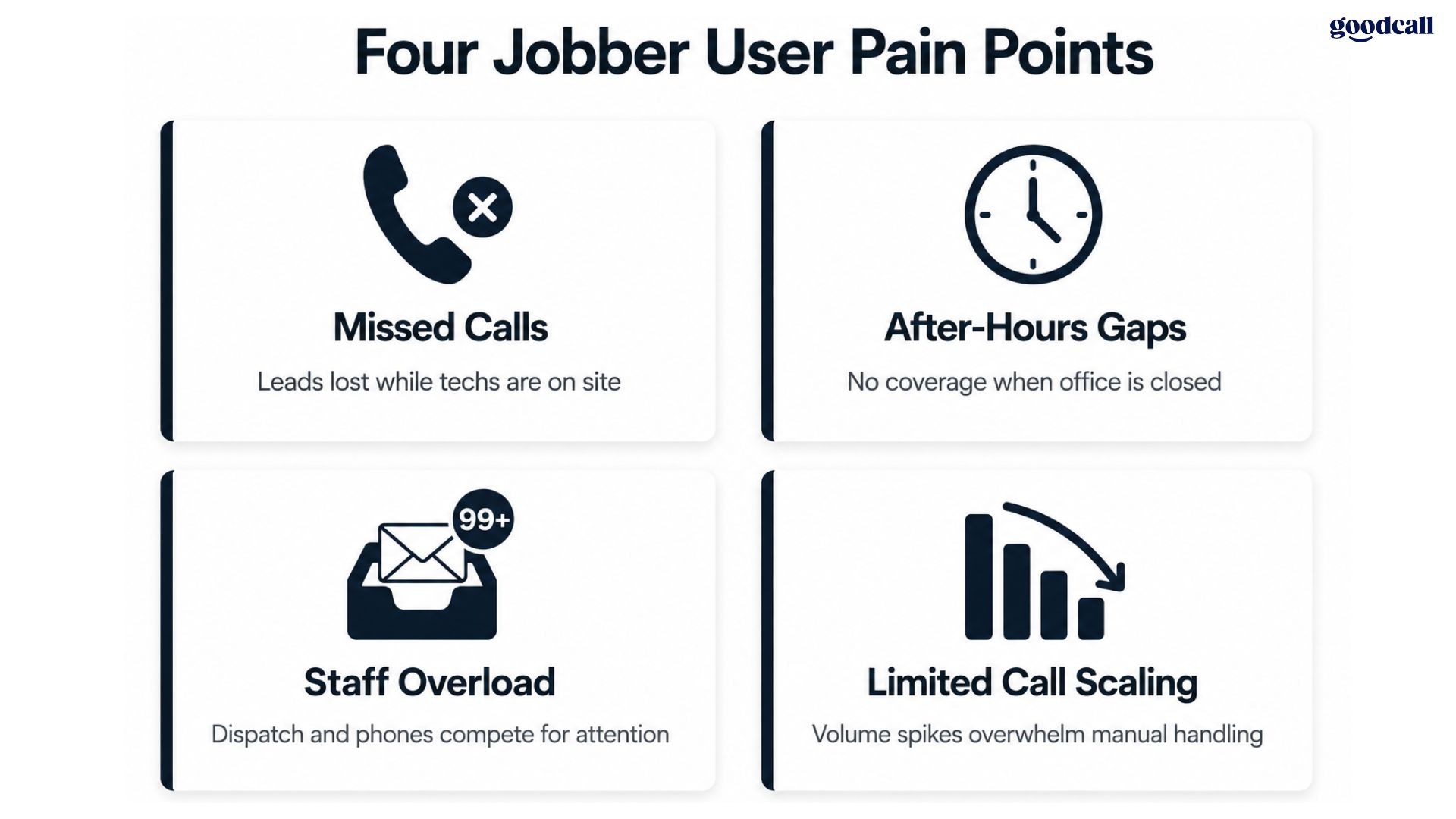
Missed calls still lead to lost jobs
When your technicians are in the field and your office is handling dispatch, incoming leads go unanswered.
Lost bookings from callers who reach voicemail during peak hours
Delayed callbacks that give competitors a head start on the same lead
After-hours inquiries that fall through the cracks entirely
Businesses searching how to stop missing calls in Jobber are facing a communication gap, not a scheduling problem.
After-hours calls go unanswered
Home service customers call after work, on weekends, during emergencies, and early mornings.
These are not edge cases. They represent a significant share of total inbound lead volume
Without 24/7 coverage, each of those calls goes to whichever competitor answers first
Every hour your phone goes unanswered after hours is an hour your competitors are booking your future customers.
Staff get overwhelmed during busy periods
Your office team handles scheduling, inquiries, dispatching, billing, and technician coordination simultaneously.
Phone interruptions reduce productivity across every other task they are managing
Rushed call handling during busy periods leads to booking errors your Jobber workflow cannot catch
The result is a communication bottleneck that grows worse the busier your business gets.
Jobber call management has limits
Jobber's AI Receptionist add-on (August 2025, $99/month) covers basic inbound calls and texts.
It works for routine inquiries at lower call volume
It does not scale for high inbound volume or complex dispatch routing
That is why many Jobber users add a dedicated third-party AI answering service alongside it.
Why Jobber Needs a Powerful Answering Service
Jobber handles what happens after a job is booked. A powerful answering service handles what happens before that moment: the inbound call, the lead qualification, and the booking confirmation.
Improve your response speed
When a customer calls a home service business, they rarely wait more than a minute before moving on.
Answer every inbound call instantly regardless of your team's availability
Capture lead details, service type, and urgency level on the first ring
Route calls to the right technician or dispatcher based on job type
Fast response is one of the highest-leverage improvements a home service business can make.
Support your field teams without interrupting them
Your technicians mid-job should be focused on the work in front of them, not fielding scheduling calls.
Incoming calls are handled automatically without interrupting active field work
Dispatchers stay focused on coordinating active jobs rather than fielding new inquiries
A dedicated Jobber phone answering layer means the phone gets answered without your field team ever knowing it rang.
Provide 24/7 coverage your team cannot
Your customers do not stop having emergencies because your office closed for the night.
Nights, weekends, holidays, and emergency call overflow captured without gaps
Simultaneous call handling during peak periods without hold queues
After-hours lead capture booking jobs directly into your Jobber calendar
Every call that reaches voicemail after hours is a job you are actively giving away.
Deliver consistent caller experience at every hour
When a customer calls at 11 PM about a burst pipe, they expect the same professional response as a 10 AM call.
Same tone, script, and qualification process regardless of hour or call volume
No missed intake details during high-volume or after-hours periods
A powerful answering service maintains your communication quality when your human team has gone home.
Key Benefits of Combining Jobber With AI Answering Services
Jobber organizes your back-end operations. AI answering captures every opportunity your front-end communication would otherwise miss. Together they close the full loop from first call to booked job.
Faster lead capture
Every caller is a potential job and most will not call back if they reach voicemail the first time.
AI answers immediately and collects customer details, service type, and urgency on every call
Qualified leads flow directly into your Jobber workflow without manual data re-entry
Speed of response is often the only difference between winning or losing a job to a competitor.
Automated appointment booking
Manual phone intake creates unnecessary steps between a caller expressing interest and a job appearing in your Jobber calendar.
Confirmed appointments sync into your Jobber calendar without dispatcher involvement
Reduces double bookings and scheduling conflicts caused by manual phone intake
Removing those steps means fewer errors and faster job confirmation for every caller.
Reduced administrative workload
Your office team is most valuable when coordinating active jobs, not answering the same pricing questions repeatedly.
AI handles appointment confirmations, service reminders, and FAQ responses automatically
No additional reception staff needed during seasonal call volume spikes
Automating repetitive call handling is the fastest way to increase your office team's capacity without adding headcount.
See how to choose the best answering service for a structured evaluation framework before committing.
How Goodcall Can Enhance the Performance of Jobber
Goodcall is an AI-powered answering service built for home service businesses. It works alongside Jobber to add a dedicated communication layer that captures every lead, qualifies every caller, and books every job your team cannot answer manually.
What Goodcall adds to your Jobber setup
Most Jobber businesses need an answering layer that covers everything from first ring to confirmed booking.
AI phone answering capturing every inbound call instantly without hold queues or voicemail
Appointment booking syncing confirmed jobs into your dispatch calendar automatically
Call routing directing urgent requests to the right technician or dispatcher
Lead capture collecting customer details and service requirements on every call
Customer FAQs answered without pulling your team away from active field jobs
After-hours and overflow call management during your busiest seasonal periods
Every inbound call becomes a structured interaction your team can act on rather than a missed opportunity.
Why it enhances Jobber specifically
Goodcall is built for the exact workflows home service businesses already run inside Jobber.
Reduces missed calls that cost your HVAC, plumbing, or cleaning business confirmed jobs every week
Improves lead response time so callers reach you before they contact a competitor
Supports customers 24/7 without adding overnight reception staff to your payroll
Runs alongside your existing Jobber setup without disrupting your current workflows
The result is a communication layer that makes your Jobber operation more complete from day one.
Verified Pricing:
$41/month billed annually
$59/month on monthly billing
No per-call or per-minute charges regardless of call volume
Jobber runs your operations well. But it cannot answer your phone while your team is in the field.
An AI answering service integrated with Jobber closes that gap. Every lead gets captured and every booking flows into your dispatch calendar automatically.
If your service business is losing jobs to missed calls, see how Goodcall works and start your free 14-day trial today.
FAQs
What is Jobber used for?
Jobber is a field service management platform used for scheduling, dispatching, invoicing, customer management, and workflow organization for home service businesses including HVAC, plumbing, cleaning, landscaping, pest control, and electrical contractors.
Is Jobber good for small service businesses?
Yes. Jobber is popular among small and mid-sized service businesses because it simplifies scheduling, invoicing, and operational management. Plans start at $39/month with a 14-day free trial and no credit card required.
Can Jobber help reduce missed appointments?
Yes. Jobber scheduling software includes automated reminders, appointment management tools, and customer communication workflows that reduce scheduling errors. However, it does not solve missed inbound calls without an additional answering service layer.
Can an AI answering service book jobs in Jobber?
Yes. An AI answering service integrated with Jobber can capture customer information, qualify the service request, and support appointment booking workflows that sync directly into your Jobber calendar without manual re-entry.
What is the best answering service for Jobber users?
Goodcall, Ruby, and AnswerConnect are strong options. Goodcall offers AI-powered flat-rate coverage from $41/month. Ruby provides live agents from $245/month. AnswerConnect delivers 24/7 live coverage from $149/month with home service experience.
How do I integrate an AI answering service with Jobber?
Most AI answering providers integrate through APIs, scheduling workflows, and CRM connections that sync customer and booking information directly into your Jobber dashboard without requiring manual data re-entry from your team.
Is AI phone answering available after business hours?
Yes. Most AI answering services operate 24/7 and help service businesses capture leads outside standard office hours. Goodcall's flat-rate model covers after-hours, weekends, and holiday overflow at the same monthly cost.
Explore Goodcall For Free
Try Goodcall's AI Phone Assistants Free for the first 14 days!