

6 Customer Support Tasks You Should Automate With AI
.png)
The era of automated customer support is on the horizon. As overwhelmed sales teams swap constant customer communication for bot-powered customer service, brand CX strategies are rapidly evolving.
With the ability to reduce labor costs by up to 90%, automating routine tasks such as answering frequently asked questions and re-routing customer calls could save your business thousands as we head into 2026.
In light of this, we’ve put together a guide to automating your own customer support using artificial intelligence and shared some of the first support tasks to delegate to your AI assistant for the best success rate.
1. Answering Frequently Asked Questions (FAQs)
Did you know that 70% of CX leaders think generative AI makes every digital customer interaction more efficient?
The first touchpoint your customers interact with when seeking support during a purchase is your FAQ page. If they are unable to find what they are looking for, their next port of call is your team itself.
With the ability to streamline the process of responding to common questions about hours, pricing, services, and policies, AI chatbots can efficientize this process.
Not only does this reduce the repetitive workload for human agents, but AI-powered customer service chatbots can provide consistent and accurate answers to each and every lead interaction.
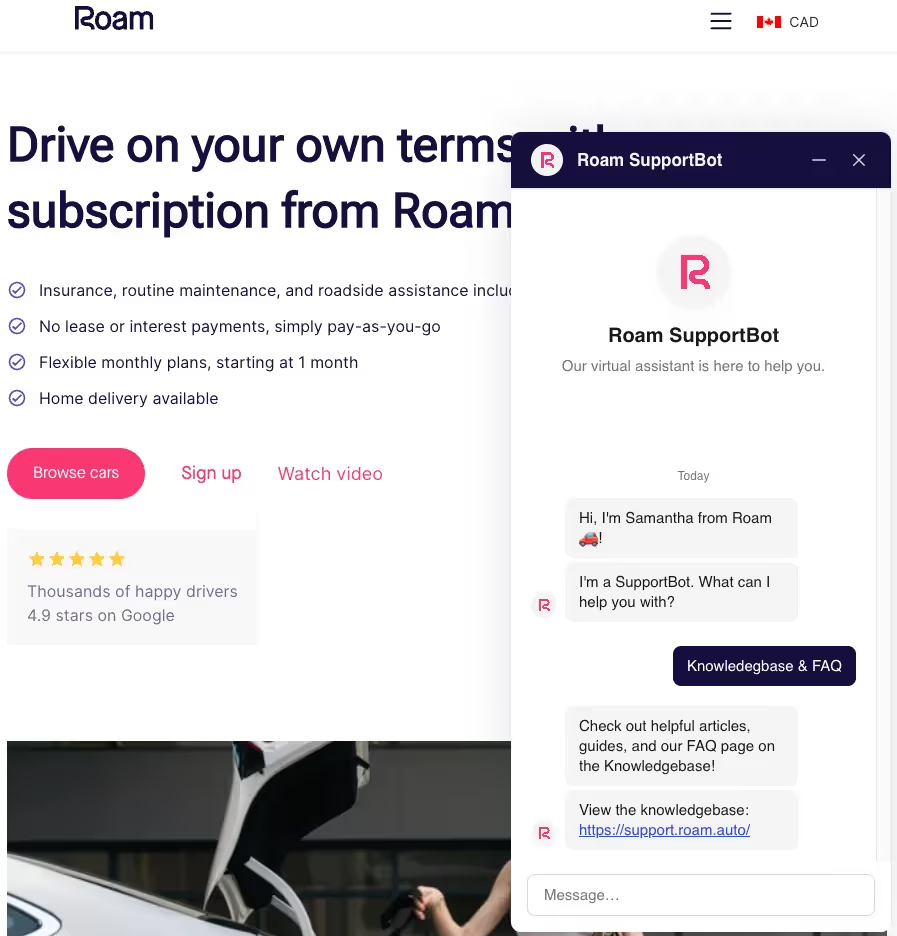
A great example of an FAQ chatbot is Roam's Samantha ‘Super Bot’. After discovering that a great deal of emails and calls centered on 5-10 frequently asked questions about their products and services, Roam uploaded all resources to their AI chatbot, Samantha, so common customer queries could be answered instantly.
As a result, the car rental company saved a whopping 30 hours per week in customer support.
2. Phone Call Handling & Call Routing
One aspect of your CX strategy that often takes up the most time is answering frequent calls from customers and qualified leads.
While maintaining communication with customers is vital in winning their business and loyalty, not all phone calls need to be managed by a human operator.
During peak hours when call volumes are high, AI-powered call handling tools could free up time for your team to focus on high-priority calls while still delivering a professional, on-brand experience to all customers.
With the ability to answer inbound calls 24/7 with no hold times, as well as routing callers to the right departments in seconds, AI certainly streamlines your inbound CX strategy.
Goodcall, for example, helps small businesses automate phone support by using AI to answer calls, qualify inquiries, and take messages when teams are busy or unavailable.
The result here is fewer lost leads and a consistent, on-brand phone experience.
In fact, customer service teams that leverage AI to improve call handling have saved 45% of the time spent on inbound calls and resolved high-priority customer issues 44% faster, according to experts at Plivo.
3. Email Sequences & Follow-Ups
Calls aren’t the only aspect of your CX strategy you can automate in 2025; your emailing strategy could be set for transformation, too.
Investing in an AI-powered email marketing platform like Hostinger Reach could help your business create, send, and manage your email marketing strategy all from one location.
For example, when programming an AI-powered trigger system for your emails, your team can create welcome automations and delayed email sequences (e.g., a series of emails sent automatically after a trigger, like a signup) that replace the need for in-person follow-ups and outbound calling.
Better still, some AI-powered emailing tools also allow you to trigger follow-up emails after missed calls, appointments, and form submissions.
The key here is to maintain your brand tone, even when your team itself is not in direct contact with the customer. Think personalization, brand colors, and tone of voice. Ideally, opt for an email marketing tool that automatically applies brand elements like logos, colors, and formatting to every email.
This is crucial if you want every interaction to feel cohesive for your customers.
4. Appointment Scheduling & Reminders
When it comes to appointment scheduling, AI could once again take the pressure off of your human agents.
For example, Goodcall’s AI phone assistant could help your team manage phone-based appointment requests by recognizing caller requests to book and automatically directing them to your online scheduling link.
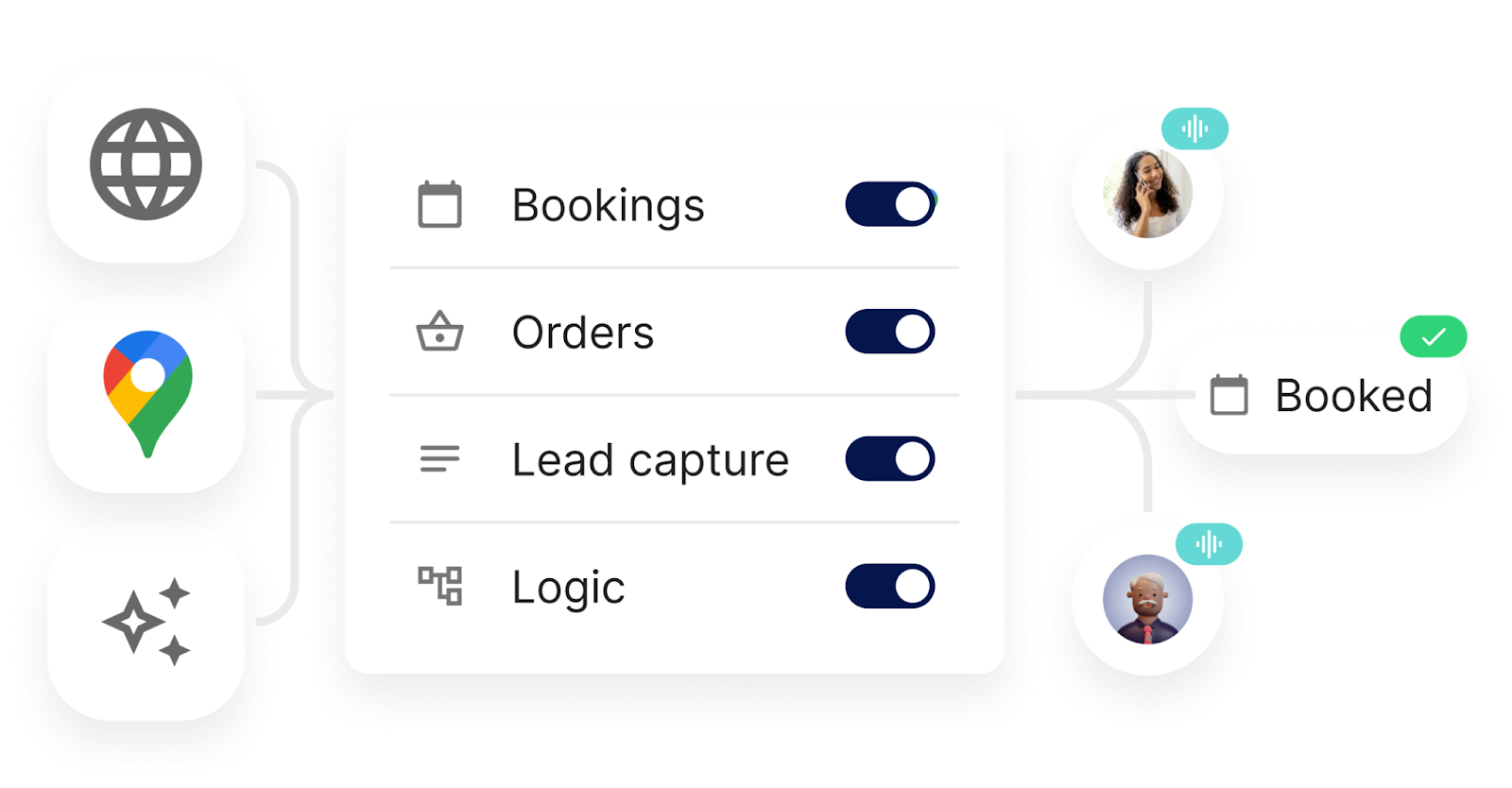
You can even configure your Goodcall agent to take appointment details over the phone, schedule it, capture that critical customer information, and then immediately insert it into your centralized dashboard for processing.
Think about how much time AI has just saved your agents? Better still, you can also program AI-powered scheduling tools to send automated confirmations and reminder notifications to each customer who books, reducing those pesky no-shows and last-minute cancellations.
5. Lead Qualification & Information Capture
The world of lead qualification continues to become more competitive. However, during the discovery process, over half of consumers report that they now prefer to interact with a bot rather than a human when inquiring about a product or service.
AI-powered bots are the perfect partners for your business, especially for lead capture.
With the ability to collect key details such as a name, contact information, and the reason for the inquiry when connecting with a customer, AI-powered chatbots can immediately filter this data into your CRM system for further nurturing.
Chatbots, in particular, are the perfect tools to leverage during the lead generation process, as they can ask the qualifying questions so your team doesn’t have to.
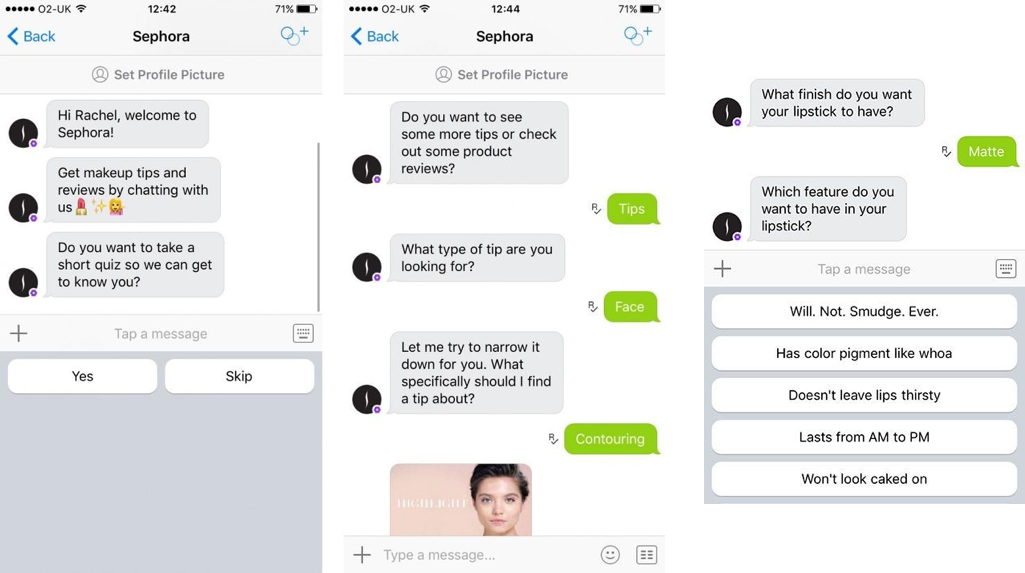
Take a look at this chatbot example from Sephora. Customers are instantly quizzed on the types of products they are looking for, their skin types, and the must-have features they need in their makeup products.
Personalizing the approach every step of the way, Sephora’s AI agent nurtures and qualifies leads before instantly linking them to their best-fit product recommendations.
If your team is dealing with high volumes of customer inquiries, a chatbot could be the key to improving your response speed and raising your conversion rates.
6. Call Summaries & Conversation Logging
Let’s not forget about your post-communication strategy. There’s nothing worse than spending time manually transcribing call details and logging conversations into your CRM.
Manual processes are always open to errors. What if you heard a customer’s email address wrong or took down the wrong date of birth?
AI phone agents can automatically transcribe and summarize customer interactions, log them, and add them directly to integrated CRM platforms.
If you’re using Goodcall, every phone call conversation can be logged and summarized instantly, making it twice as easy for your team to track every interaction and follow up with a personalized touch.
Wrapping Up
There’s no doubt that automating aspects of your CX strategy is essential in an increasingly busy marketplace.
According to experts at Tidio, “approximately 80% of customers who have interacted with AI-powered customer service reported positive experiences, highlighting satisfaction with rapid responses.”
If you’re planning to integrate AI into any of your customer touchpoints in 2026, the key is to find tools that naturally reflect your brand's tone and keep your team at the forefront of any customer communication.
If your phone lines are your first port of call, Goodcall’s AI phone assistants make it easy to streamline customer interactions while still staying on-brand.
With 70% of CX leaders now planning to introduce AI into two or more of their customer touchpoints, now could be the time to make the leap, ensuring that in 2026, your team can focus on meaningful conversations while AI takes care of repetitive tasks.