#Voice AI
June 26, 2026
Zapier MCP Complete Guide: How to Connect Your AI to 8,000+ Apps
Share this post


Explore AI Summary


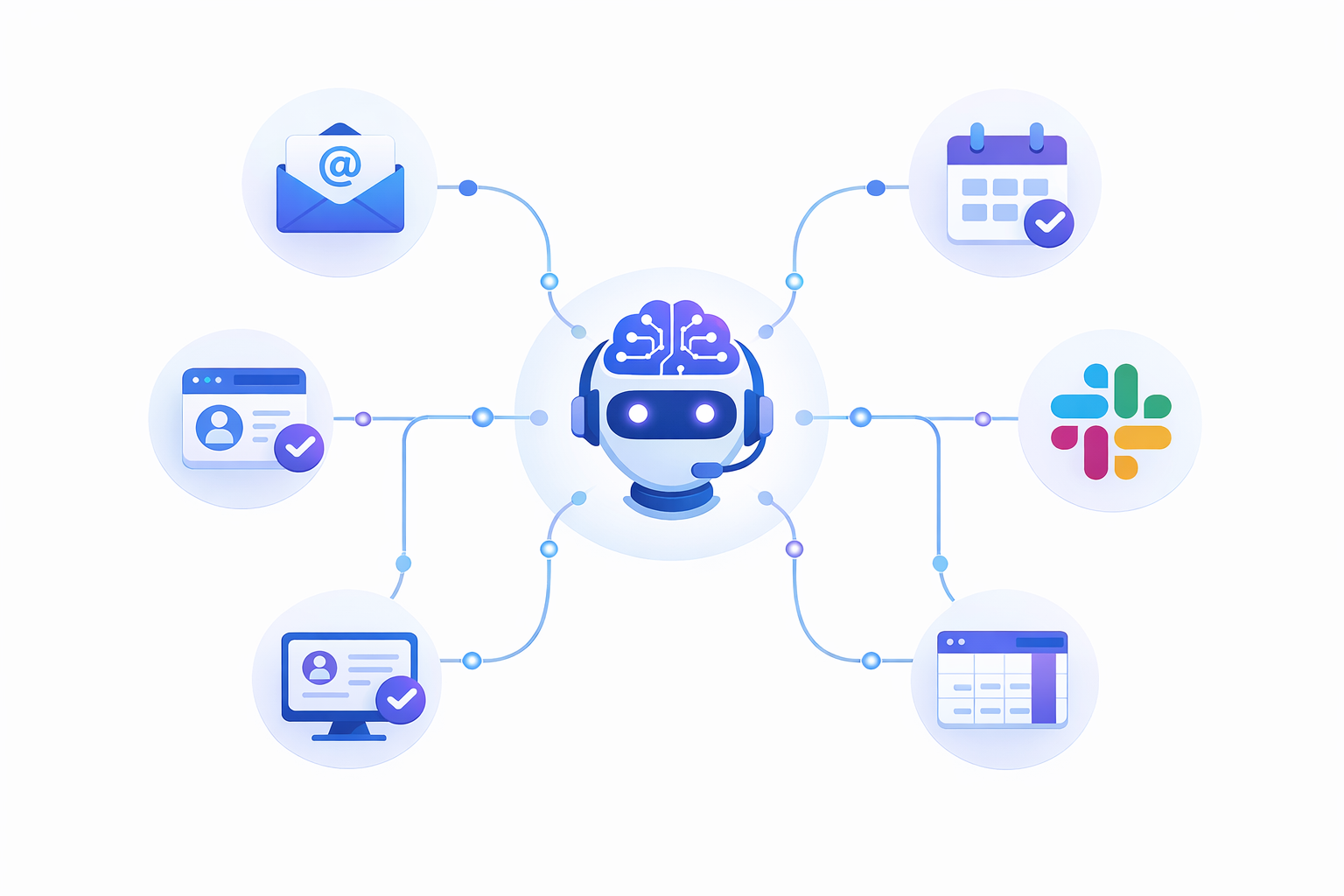
AI assistants have become a standard part of how teams work. They draft content, summarize information, and suggest actions. But the moment a task requires touching an external app, the AI stops and the human takes over.
That handoff is where productivity breaks down. Zapier MCP was built to remove it. Here is everything you need to know to set it up and use it effectively.
Zapier MCP is a managed MCP server provided by Zapier that gives AI assistants direct access to 8,000+ app integrations and 30,000+ callable actions. Each action is a specific operation inside an app. Gmail alone exposes "Send Email," "Create Draft," and "Find Email" as separate callable tools.
The protocol behind it is called Model Context Protocol (MCP), an open standard introduced by Anthropic in November 2024. It defines how AI applications communicate with external tools.
How the connection works:
What this changes in practice: Without MCP, your AI works in a closed loop. It can write a follow-up email, but you still copy it into Gmail and hit send. With Zapier MCP, the AI sends the email itself. The same applies to CRM updates, calendar events, Slack messages, and spreadsheet entries.
Availability: Zapier MCP is available on all plans, including the free tier. Each tool call uses two tasks from your quota. Non-technical users can set it up with ChatGPT or Claude in minutes. Developers can also connect through OpenAI's Responses API, Anthropic's Messages API, or tools like Cursor and Windsurf.
Understanding what Zapier MCP is sets the foundation. The next section covers what you can actually do with it.
You describe what you want in natural language. The AI finds the right Zapier action and executes it. Here are the five most common action types.
For businesses using AI phone agents, these same workflows extend into post-call automation. A completed call can trigger CRM updates or team notifications without manual data entry.
Once your server is set up, every interaction follows the same five-step pattern.
Built-in meta-tools: If you are troubleshooting a failed action or setting up your server for the first time, built-in meta-tools are available on every MCP server before you configure any custom actions. They let your AI list all available actions, check whether each app connection is active, and read the required parameters for any given tool.
Authentication options:
All connections run over TLS encryption. You can rotate your server URL from the Connect tab if you ever need to revoke access.
One important design detail: The server runs one action per call. A multi-step instruction (search for a contact, update their record, send an email) requires separate calls in sequence. The server does not chain actions internally. Larger models with stronger reasoning (GPT-4o, Claude Opus) handle multi-step sequencing more reliably than smaller ones.
Setup takes under five minutes.

Step 1: Visit mcp.zapier.com and click "+ New MCP Server."
Step 2: Select your AI client from the dropdown. Give your server a name.
Step 3: Copy the server URL that Zapier generates.
Step 4: Open your AI client's MCP settings and paste the URL. In Claude Desktop, add it to claude_desktop_config.json. In ChatGPT, use the MCP connection flow in settings.
Step 5: Add tools to your server. Click "+ Add tool" on the Configure tab. Search for an app (e.g., Gmail). Select an action (e.g., "Send Email"). Connect your account. Set default field values or leave them for the AI to fill.
Each tool becomes a callable action in your AI client. Zapier's official setup guide covers instructions for additional platforms.
Security note: Your server URL acts like a password. Do not share it publicly. If you suspect unauthorized access, rotate it from the Connect tab.
Once your server is live, the use cases below show where most teams get the most value fastest.
The highest-value use cases are tasks that currently require switching between three or more apps to complete.
These use cases share one pattern: they replace multi-tab, multi-step manual work with a single prompt. The more cross-app tasks your team handles daily, the faster the time savings compound.
Zapier MCP and Agents both let AI take actions in your apps. The difference is when and how each one runs.
Zapier Agents: Run in the background without your involvement. You set them up once, and they handle recurring tasks automatically. Example: every new form submission triggers a four-step workflow across your CRM, email, and Slack.
Zapier MCP: Runs on demand inside your AI client. You give a specific instruction, and the AI executes it in real time. Example: "update this deal in HubSpot and email the client with these details."
Traditional Zaps: Follow fixed "if this, then that" logic with no AI reasoning involved.
Most teams use Agents and MCP together rather than choosing one over the other. Agents handle the repeatable processes. MCP handles the one-off requests that come up during your workday.
If you are building an agentic AI architecture where multiple AI components need to trigger actions across business apps, MCP handles the execution layer.
Before building out your workflows, the mistakes below are worth knowing so you do not have to learn them the hard way.
Getting the setup right from the start prevents the most common points of failure.
Avoiding these five mistakes covers the majority of setup issues teams run into in the first week. The limitations below are the remaining constraints worth knowing before you build.
Zapier MCP handles most cross-app workflows well. These are the cases where it falls short.
The answer depends on how often your team crosses app boundaries to complete a task.
Use Zapier MCP if:
Start with the free tier if:
Consider volume carefully if:
For AI phone agents specifically, Goodcall's Zapier integration is a working reference for post-call automation: logging outcomes, triggering confirmations, and routing leads without manual data entry. See how Goodcall works.
What is Zapier MCP in simple terms?
Zapier MCP is a server that connects your AI assistant (ChatGPT, Claude, or Cursor) to thousands of apps through Zapier. Your AI takes real actions using natural language instead of manual clicking.
What can you do with Zapier MCP?
You can send emails through Gmail, update CRM records in HubSpot or Salesforce, create Google Calendar events, post Slack messages, log data to spreadsheets, and trigger actions across 8,000+ supported apps.
How does Zapier MCP work?
Your AI sends a natural language instruction to the Zapier MCP server. The server authenticates with the target app, maps parameters to the correct API fields, and executes the action. Results return to your AI client.
How do you get started with Zapier MCP?
Visit mcp.zapier.com, create a server, select your AI client, copy the server URL, paste it into your AI tool's settings, and add actions. Setup takes under five minutes.
What are common use cases for Zapier MCP?
Common use cases include lead qualification, CRM updates, meeting prep across multiple tools, content scheduling, post-call automation for AI phone agents, and cross-app data syncing.
Can Zapier MCP handle complex workflows?
Yes. The server processes one action per call, and the AI model handles sequencing across multiple calls. For recurring automations that run without AI involvement, Zaps or Zapier Agents fit better.
What mistakes should you avoid with Zapier MCP?
Avoid enabling too many tools at once, using vague action names, sharing your server URL publicly, underestimating task costs (two per call), and leaving sensitive fields unconfigured.
What are the limitations of Zapier MCP?
Key limitations include two tasks per call at volume, no built-in action chaining, possible latency for real-time apps, incomplete action coverage across some apps, and admin approval requirements for enterprise accounts.
How much does Zapier MCP cost?
Zapier MCP is included on all Zapier plans at no extra charge. Each tool call uses two tasks from your quota. Free plan: 100 tasks/month. Professional: 750. Team: 2,000.