

Voice AI Architecture Explained: How Calls Turn Into CRM Data
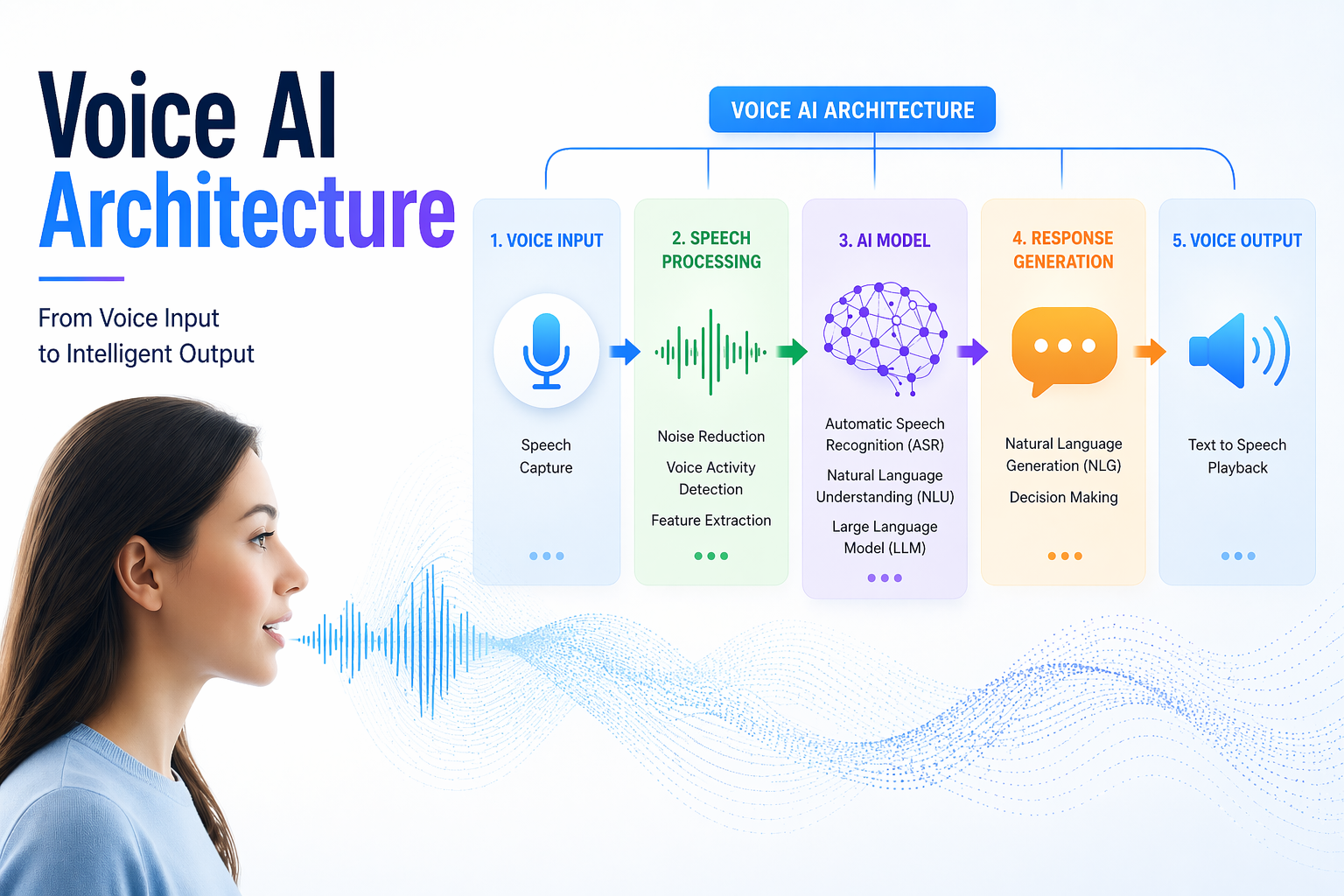
Every missed call is a missed opportunity. The possibility of a forgotten note, an incorrect name, or a lead that never enters your system exists for every call taken at 6 PM on a Friday by a weary receptionist. The frustrating part? The technology to fix this has existed for years, but most companies still view it as a black box.
This is a breakdown of voice AI architecture, the system that takes a phone call, understands what the caller wants, and sends clean, structured data straight into your CRM. No manual entry. No dropped leads. No "I'll add it later."
What Is Voice AI Architecture?
Think of voice AI architecture as the nervous system of your phone lines. Similar to how the nervous system transmits signals from your fingertips to your brain and back, this architecture transmits a caller's speech from the time they start speaking.
Don't think of it as a single tool. It's actually a stack of specialized technologies that pass the baton to one another in milliseconds.
Core components at a glance:
- Telephony Layer: Handles call ingestion, SIP trunking, and audio streaming
- ASR (Automatic Speech Recognition): Converts spoken audio into raw text
- NLU (Natural Language Understanding): Extracts intent and entities from text
- Dialogue Manager: Decides the next response or action based on context
- LLM (Large Language Model): Powers conversational reasoning and dynamic responses
- TTS (Text-to-Speech Engine): Converts system responses back into spoken audio
- CRM API Layer: Pushes structured data to your database in real time
- Orchestration Engine: Ties every component together and manages latency
Every component serves a distinct purpose. They don't operate independently. The weakest handoff between them determines how robust the architecture is.
How Voice AI Works: Step-by-Step From Call to CRM Integration
Now that the components are on the table, the natural question is: what actually happens during a live call? Walk through the journey from the first ring to the final CRM entry.
Unlike traditional IVR systems that rely on rigid "press 1 for billing, press 2 for support" menus, modern conversational AI architecture uses NLU to understand intent in natural speech, the way a person would actually say it.
Here is how voice AI works, step by step:
1. The Call Arrives: The caller dials in. The telephony layer receives the audio stream and immediately forwards it to the ASR engine in real time without buffering.
2. Audio Becomes Text: The ASR engine listens to the audio and converts it into a text transcript. The engine is trained to handle accents, background noise, and fast speech.
3. Text Becomes Intent: The NLU model reads the transcript and identifies what the caller actually wants. A caller saying "I need to move my appointment to Thursday" is not just producing words. The NLU pulls out intent (reschedule), entity (appointment), and time reference (Thursday) from the speech.
4. The Dialogue Manager Takes Over: Based on the intent, the dialogue manager decides what happens next. Does the system ask a clarifying question? Confirm the action? Transfer to a human agent? This is the decision-making layer.
5. The LLM Shapes the Response: For complex conversations, the LLM generates a natural-sounding reply that fits the context. This is what separates a rigid script from a fluid, human-like conversation.
6. The Response Is Spoken: The TTS engine converts the generated response into speech and delivers it back to the caller. The entire loop from hearing to responding typically happens in under one second in a well-built system.
7. Data Hits the CRM: Once the call concludes, or even mid-call, depending on the workflow, the orchestration engine formats the captured data and pushes it to the CRM via API. The caller's name, request, phone number, and any other captured fields are logged automatically.
Voice AI Performance: Latency, Accuracy, and Cost Trade-offs
With the architecture mapped out, performance becomes the next honest conversation. There is a real tension at the heart of every voice system: speed versus intelligence.
When you compare latency and accuracy, it becomes clear that sub-second response times are non-negotiable for customer satisfaction. A caller who hears a pause longer than 1.5 seconds after speaking will assume the call has dropped. They either repeat themselves or hang up. Both outcomes break the experience.
But accuracy and processing depth require computing time. A more capable LLM that understands complex multi-part requests takes longer to respond than a lightweight model running a limited script. This is the real-time voice AI processing challenge that every architecture team faces.
The trade-offs break down like this:
| Priority | Trade-off | Best For |
|---|---|---|
| Speed | Lower model complexity, faster response | High-volume intake calls |
| Accuracy | Higher compute, slightly slower | Complex service queries |
| Cost Efficiency | Smaller models, rule-based fallbacks | Repetitive FAQ handling |
| All Three | Hybrid routing (LLM + rule engine) | Enterprise deployments |
The smartest systems don’t use a "one-size-fits-all" approach. Instead, they act like a smart switchboard that routes tasks based on how hard they are:
- Simple tasks (like confirming an appointment) go to a fast, cheap, "lightweight" model.
- Complex tasks (such as resolving a billing dispute) are sent to a highly intelligent, "heavyweight" model.
This "brain" that decides where each task goes is called the orchestration engine. It ensures you aren't wasting a "super-brain" on a task a basic calculator could handle.
Key Technologies Behind Voice AI Architecture
Performance depends on what specific technologies power each layer. Forget the jargon for a second. Let’s look at this through three simple buckets: Hearing, Thinking, and Speaking.
These buckets describe what the technology does, not just what it is called.
Hearing: The ASR Layer
This is the speech-to-text AI pipeline that converts audio into usable text. Leading ASR engines include Google's Speech-to-Text, AWS Transcribe, and Deepgram. What separates a strong ASR layer from a weak one is how it handles noise, accents, and domain-specific vocabulary, such as medical terms, legal phrases, brand names, and product SKUs.
Thinking: NLU and LLM
Once the words are captured, a thinking layer takes over and performs two key roles:
- NLU (The Fact Finder): It identifies exactly what you want and pulls out specific details, like names or dates.
- LLMs (The Brain): They handle the complex reasoning, remember the conversation history, and talk back like a real person.
By combining these two, the system stops feeling like a rigid "Press 1 for Support" bot and starts feeling like a real representative who actually understands you.
Speaking: The TTS Engine
Text-to-Speech engines have improved dramatically. Modern TTS solutions produce speech that is nearly indistinguishable from a human voice in controlled conditions. The choice of the TTS engine directly affects caller trust. A robotic voice causes people to disengage. A natural voice keeps them on the line.
Top Voice AI Use Cases
Having established what the architecture is made of and how it performs, the more grounded question is: where does this actually get deployed, and what kind of return do businesses see?
Here are the key industries accounting for the highest-ROI deployments of AI call handling systems today:
1. Dental and Medical Practices (Scheduling and Reminders)
Medical front desks are overwhelmed. Staff spend hours each week managing appointment calls, confirming visits, and relaying information that a voice system can handle at scale. Implementing an AI Voice Agent for Appointment Booking allows medical and service-based businesses to fill their calendars without human intervention, even after office hours.
2. Home Services (Lead Capture)
A plumber or HVAC company running three technicians in the field cannot always answer a call at 2 PM on a Tuesday. Before the technician completes the present task, voice AI formats and stores the caller's name, address, problem description, and chosen time window in the CRM.
3. E-commerce and Retail (Order Tracking and Returns)
Customers calling to track orders or initiate returns are asking repetitive, structured questions. An AI call handling system handles these calls end-to-end with no human involvement, freeing support staff to handle escalations and complex cases that actually require judgment.
Benefits of Voice AI From Call to CRM Automation
Voice AI transforms raw conversations into structured, actionable CRM data in real time, eliminating manual effort and delays. Here’s how this automation delivers measurable advantages across operations and customer experience:
- Real-time data capture and logging: Automatically converts conversations into structured CRM entries, ensuring no critical customer detail is missed or delayed during post-call documentation.
- Improved agent productivity: Eliminates manual note-taking and data entry, allowing agents to focus on meaningful interactions and handle higher call volumes efficiently.
- Enhanced data accuracy and consistency: Reduces human error by standardizing how customer information is captured, tagged, and stored across all interactions.
- Faster response and follow-ups: Instantly updates CRM systems, enabling sales and support teams to trigger timely actions, reminders, or workflows without delays.
- Actionable insights through analytics: Transcribed and structured call data can be analyzed for trends, sentiment, and intent, improving decision-making and strategy.
- Seamless integration with workflows: Automatically triggers CRM workflows such as ticket creation, lead scoring, or escalation, reducing operational friction.
- Scalable customer engagement: Handles large volumes of calls while maintaining consistent data capture quality, supporting business growth without proportional resource increases.
Challenges of Voice AI Systems
Credibility comes from acknowledging where Voice AI can fall short: Let’s look at some key limitations to address:
- Hallucinations in Language Models
Language models can generate confident but incorrect responses, such as confirming unavailable slots or incorrect pricing. Guardrails like CRM verification and fallback logic are essential to minimize risk.
- Background Noise and Audio Quality
Background noise, accents, or weak signals can reduce transcription accuracy and impact downstream processing. While noise cancellation helps, challenging environments still affect performance.
- Robotic Voice Perception
Issues like unnatural pauses, mispronunciations, or monotone delivery can make interactions feel artificial. Customizing voice tone and persona is critical to maintain user trust.
- Compliance and Privacy
Business owners often ask, "Is Voice AI safe?" Voice AI systems must adhere to regulations, such as HIPAA, PCI, and regional consent laws. Failing to embed compliance into architecture can expose businesses to legal and financial risks.
How Goodcall Automates Voice AI Architecture for Your Business
Goodcall streamlines the entire Voice AI architecture by seamlessly capturing, transcribing, and structuring call data into CRM-ready formats in real time. It integrates directly with business systems to automate workflows like lead creation, ticketing, and follow-ups without manual intervention. This end-to-end automation ensures faster operations, higher data accuracy, and a scalable foundation for customer communication.
How Goodcall Powers End-to-End Voice AI Automation:
- Automated call transcription and structuring: Converts live conversations into structured CRM fields instantly, eliminating manual data entry and ensuring accurate record-keeping across every interaction.
- Seamless CRM integration: Syncs captured data directly with CRM platforms, enabling automatic lead creation, updates, and activity logging without human involvement.
- Intelligent workflow triggering: Initiates actions like follow-ups, ticket generation, or routing based on call intent, reducing response time and operational overhead.
- Real-time insights and analytics: Analyzes conversations for intent, sentiment, and key signals, helping teams make faster, data-driven decisions.
- Scalable call handling infrastructure: Supports high call volumes while maintaining consistent data capture and processing quality across all customer interactions.
Voice AI Implementation Checklist
Before wrapping up, here is the practical starting point for any business considering a deployment. Use this as a readiness audit before approaching any vendor conversation.
- Audit your current call volume. Know how many inbound calls you receive per day, week, and peak hour. This determines the architecture tier you need.
- Map your CRM fields. Identify exactly what data should be captured from each call type. Name, phone, request type, and preferred time are the baseline.
- Script your AI's persona. Decide what the voice agent is named, how it introduces itself, and what tone it takes. This is brand work, not just technical work.
- Identify your call types. Separate structured calls (appointments, order tracking) from unstructured ones (complaints, complex inquiries). Route each appropriately.
- Confirm your compliance requirements. State recording laws, HIPAA status, and PCI relevance should be confirmed before any audio is captured or stored.
- Define your fallback protocol. Every voice system needs a clear rule for when to transfer to a human. Set that threshold before launch, not during a customer escalation.
- Integrate and test your CRM connection. Run test calls end-to-end and verify that data appears in the CRM exactly as expected, before going live.
The businesses that see the fastest ROI from voice AI are the ones that did the groundwork first. A well-scoped deployment that handles 80% of call types cleanly is far more valuable than an ambitious one that handles 100% of call types poorly.
FAQs
What is voice AI architecture?
Telephony, ASR, NLU, LLM, TTS, and CRM APIs are among the layered technologies that collaborate to receive a spoken call, comprehend it, answer it, and automatically record the result.
How long does it take to implement voice AI?
A platform like Goodcall can be configured and live within days for most businesses. Custom enterprise deployments with complex integrations can take several weeks.
Can voice AI handle calls in multiple languages?
Yes, depending on the ASR and NLU models selected. English is universally supported. Spanish, French, and other languages are increasingly available across leading platforms.
What happens when the voice AI cannot understand a caller?
A well-configured system has a fallback protocol that transfers the caller to a human agent after a set number of failed intents. No system should leave a caller stuck in a loop.
Is voice AI only for large businesses?
No. Given the largest ratio of unanswered calls to available staff, small service firms, such as dentist offices, plumbers, and hairdressers, frequently see the best ROI.
Does voice AI replace receptionists?
It handles repetitive, structured calls so that human staff can focus on complex interactions, escalations, and relationship-building. It augments the team rather than replaces it.
How secure is the data captured by voice AI?
Security depends entirely on the provider. Look for HIPAA and PCI compliance, encrypted storage, role-based access controls, and transparent data retention policies before signing with any vendor.