Running a funeral home requires precision, discretion, and constant coordination across staff, facilities, and families.
Even minor scheduling errors can create operational strain and damage hard earned community trust.
Funeral home appointment scheduling software provides structured oversight of bookings, calls, and resources, helping your team maintain reliability and reduce administrative friction.
Here is why that structure has become essential for modern funeral homes.
Why Funeral Home Appointment Scheduling Software Is Essential for Modern Funeral Homes
Funeral homes operate where timing, coordination, and clarity are non-negotiable. When arrangement meetings, vehicle logistics, and documentation deadlines overlap, manual tracking across disconnected systems turns small errors into serious disruptions.
- Real-time conflict visibility prevents overlapping services before families are affected
- 24/7 intake capture ensures no inquiry is missed during after-hours or peak periods
- Automated resource allocation eliminates last-minute staffing and vehicle scrambles
- Controlled communication flows reduce confusion between staff and families
The NFDA's 2025 Consumer Awareness & Preferences Study confirms families now rely on digital channels when researching funeral services, making funeral home appointment scheduling software essential for modern operations.
Top Features to Look for in Funeral Home Appointment Scheduling Software
The right funeral appointment booking system should reflect the operational complexity of funeral service work. Each feature must reduce risk, improve clarity, and support structured coordination instead of simply digitizing a paper calendar.
Centralized Multi Resource Calendar
Funeral homes rarely manage a single appointment at a time. A true centralized calendar must reflect simultaneous use of chapels, vehicles, staff, clergy, and preparation rooms.
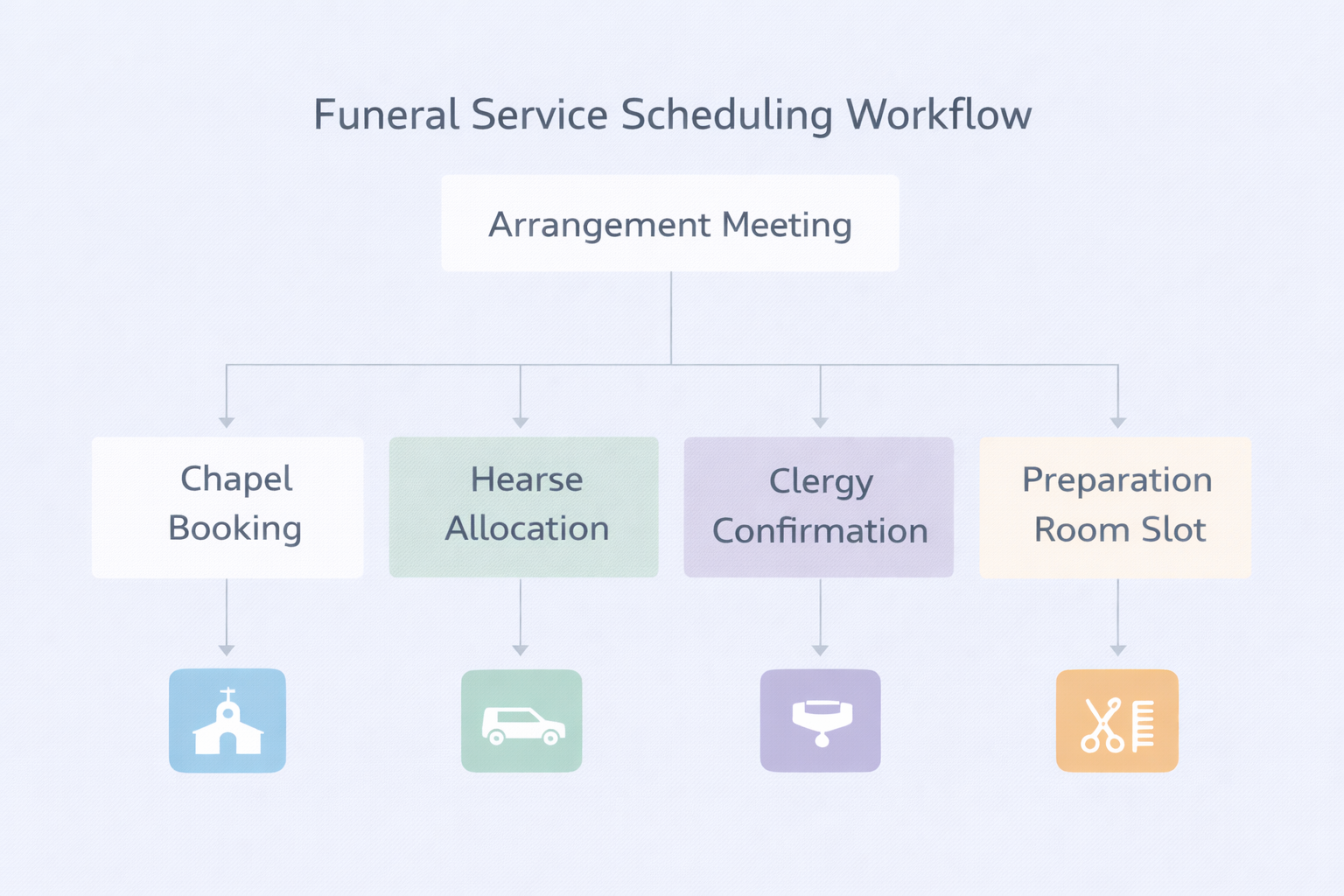
Look for systems that:
- Provide layered visibility across service type, location, and assigned staff so conflicts are identified before confirmation
- Allow configurable time buffers to account for preparation, travel, and cleanup between services
- Support multi location scheduling without duplicating calendars
- Display resource dependencies so vehicle or facility limitations are immediately visible
A centralized calendar is not just about visibility. It is about preventing logistical bottlenecks before families are impacted.
Real Time Staff and Resource Management
Availability accuracy determines execution quality. Scheduling software must reflect changes immediately.
Effective funeral home scheduling software should:
- Synchronize staff shifts and time off approvals to prevent assignment errors
- Track vehicle and equipment utilization to avoid double allocation
- Provide task confirmation indicators so preparation steps are not overlooked
- Offer visual scheduling clarity that allows managers to identify overload patterns
This level of insight prevents last minute staffing scrambles during emotionally sensitive services.
Automated Notifications and Reminders
Inconsistent communication creates confusion and reputational risk. Automation must enhance professionalism, not replace empathy.
Strong systems provide:
- Structured reminder sequences for arrangement meetings and services
- Internal alerts for schedule changes that include context and updated details
- Confirmation workflows that reduce ambiguity around responsibilities
- Secure communication portals that maintain privacy standards
Thoughtful automation ensures no critical update is missed while maintaining respectful communication standards.
Secure Documentation and Digital Workflows
Funeral arrangements involve sensitive documents that require accuracy and confidentiality.
Your system should support:
- Centralized digital case records linked directly to scheduled services
- Remote document review for families unable to attend in person
- Electronic signature workflows that reduce processing delays
- Role based access controls to protect confidential information
Digital workflows reduce paperwork friction while maintaining compliance discipline.
Reporting and Operational Insights
Scheduling data should support informed decision making rather than sit unused.
Look for platforms that provide:
- Service volume tracking to identify peak demand periods
- Staff utilization analytics that highlight capacity imbalances
- Revenue alignment with scheduled services for forecasting accuracy
- Custom dashboards for daily and monthly operational review
Insight-driven scheduling and funeral service automation tools allow managers to anticipate demand rather than react to operational strain.
For a broader overview of what these features look like across scheduling platforms, see Goodcall's guide to appointment scheduling software benefits.
Key Benefits of Using Funeral Home Appointment Scheduling Software
The value of funeral home appointment scheduling software extends beyond convenience. It introduces structured discipline into operations where precision directly affects service quality.
Reduced Operational Risk
Automated conflict detection and structured resource allocation significantly reduce the likelihood of overlapping services, misplaced staff assignments, and vehicle scheduling errors.
Stronger Execution Consistency
Clear task ownership and visible preparation timelines ensure every service follows a consistent operational standard regardless of staffing changes.
Improved Intake and Appointment Capture
When scheduling systems integrate with intake processes, fewer inquiries fall through administrative gaps, particularly during high volume or after hours periods.
Increased Administrative Efficiency
Digitized workflows eliminate repetitive manual reconciliation between calendars, call logs, and paper notes, freeing leadership to focus on service quality.
Enhanced Reputation Protection
Consistent scheduling accuracy reinforces professionalism and reliability within the community, strengthening long term trust.
Scalable Growth Framework
As service volume increases or additional locations open, structured scheduling prevents complexity from overwhelming administrative capacity.
Over time, these gains strengthen operational resilience and reduce preventable scheduling strain.
How Funeral Homes Lose Leads Without Appointment Scheduling Software
Many funeral homes underestimate how frequently operational friction affects intake and bookings.
Without structured scheduling systems, funeral homes risk:
- Missed after hours inquiries that redirect families elsewhere
- Delayed follow up due to fragmented call logs
- Duplicate entries that create confusion during arrangements
- Staff overload during seasonal peaks
Without centralized oversight, even experienced teams struggle to prevent these gaps consistently.
Modern funeral appointment booking systems ensure inquiries are captured, logged, and scheduled systematically.
How to Choose the Best Funeral Home Appointment Scheduling Software
Selecting software requires evaluating operational alignment rather than surface level features.
Identify Core Operational Gaps
Conduct an internal review of recurring friction points such as:
- Staff coordination breakdowns
- Resource allocation conflicts
- Inconsistent family communication
- Call overflow during peak demand
- Multi location scheduling challenges
Your chosen system must directly resolve these recurring breakdowns.
Evaluate Scalability and Integration
Growth introduces operational complexity. The best funeral home scheduling software should:
- Integrate with funeral home CRM software to prevent duplicate data entry
- Connect with accounting systems for billing accuracy
- Support increasing service volume without performance degradation
- Maintain operational visibility across locations
Avoid systems that require replacement as your organization expands. For context on how scheduling platforms typically handle CRM integration, see Goodcall's overview of appointment scheduling software types.
Assess Ease of Adoption
Adoption determines effectiveness.
Look for:
- Clear user interfaces that reduce onboarding time
- Minimal configuration barriers
- Logical workflow mapping
- Role based permissions that reflect real responsibilities
Technology should reduce friction rather than introduce additional complexity.
How to Evaluate Vendors: Questions to Ask Before You Sign
Choosing funeral home scheduling software means securing a reliable operational partner, not just purchasing a tool. Downtime or slow support during active arrangements can directly impact grieving families.
- Onboarding support: ask who guides implementation and what the timeline looks like
- Uptime guarantees: confirm how service disruptions are handled in real time
- After-hours support: verify emergency access outside standard business hours
- Data security: ensure family data is encrypted both at rest and in transit
- CRM integration: confirm how the platform connects with your funeral home CRM software and whether it is native or a paid add-on
Request documented service level agreements and speak with funeral homes of similar size before signing.
How to Implement Funeral Home Appointment Scheduling Software
A phased rollout ensures funeral service automation tools become embedded into daily operations without disrupting active service delivery.
- Define success metrics such as reduced conflicts, faster intake capture, or quicker document turnaround
- Audit existing data to eliminate duplicates and inconsistencies before migration
- Configure workflows around real service procedures, not default software templates
- Train staff by role using practical daily scenarios rather than broad feature walkthroughs
- Run a controlled pilot before full deployment to catch friction points early
Assign internal champions to drive adoption, and ensure your funeral home scheduling software is connected to existing systems from day one.
How to Solve Most Common Scheduling Software Problems
Even well designed systems encounter friction during real world use. Addressing issues early prevents minor inefficiencies from becoming structural weaknesses.
The most common challenges stem from process gaps rather than software limitations.
Staff Hesitation
Resistance typically arises from unfamiliar workflows or fear of added complexity.
To address this:
- Provide short, role specific training sessions rather than broad feature demonstrations
- Highlight time savings and conflict reduction outcomes tied directly to daily tasks
- Designate internal super users who can support colleagues informally
When staff understand how the system simplifies their responsibilities, adoption improves naturally.
Notification Fatigue
Excessive alerts dilute urgency and reduce responsiveness.
Mitigate overload by:
- Categorizing notifications by priority level
- Reserving urgent channels for time sensitive service changes
- Reviewing notification settings quarterly to align with operational needs
Balanced communication maintains clarity without creating distraction.
Data Inconsistency
Inconsistent data entry undermines reporting and scheduling accuracy.
Prevent this by:
- Establishing clear data entry standards
- Conducting weekly schedule audits
- Assigning a scheduling lead responsible for oversight and correction
Consistency ensures the system remains trustworthy as a decision making tool.
Integration Disruptions
When scheduling software disconnects from CRM or accounting systems, duplicate work increases.
Protect against this by:
- Testing integrations after software updates
- Maintaining documented escalation paths with vendors
- Monitoring data synchronization regularly
Addressing these issues proactively ensures technology supports operations rather than introducing new vulnerabilities.
Consistent governance and structured oversight turn scheduling software into a dependable operational backbone rather than a reactive tool.
How Emerging Technologies Will Transform Your Funeral Home Operations
AI-powered funeral home software continues to expand beyond static calendar management.
Emerging capabilities include:
- Predictive scheduling based on historical demand patterns
- AI answering service funeral homes can deploy to capture intake consistently
- Voice enabled schedule updates for mobile coordination
- Demand forecasting tools that support staffing decisions
- Unified mobile dashboards for multi location oversight
These technologies reduce administrative strain while preserving the human centered nature of funeral service.
Why Goodcall Is the Best Funeral Home Appointment Scheduling Software
Traditional funeral home scheduling software becomes active only after an appointment is manually entered into the calendar. However, many operational breakdowns occur earlier, during initial call intake and inquiry handling.
In funeral service, first contact often determines whether a family moves forward with your firm. Missed calls, delayed callbacks, or after hours voicemail gaps can quietly redirect families to competing providers without your team realizing it.
Goodcall addresses this intake vulnerability directly.
Intake and Scheduling in One Structured Workflow
Goodcall combines appointment scheduling automation with AI powered call handling, creating continuity from first inquiry to confirmed booking.
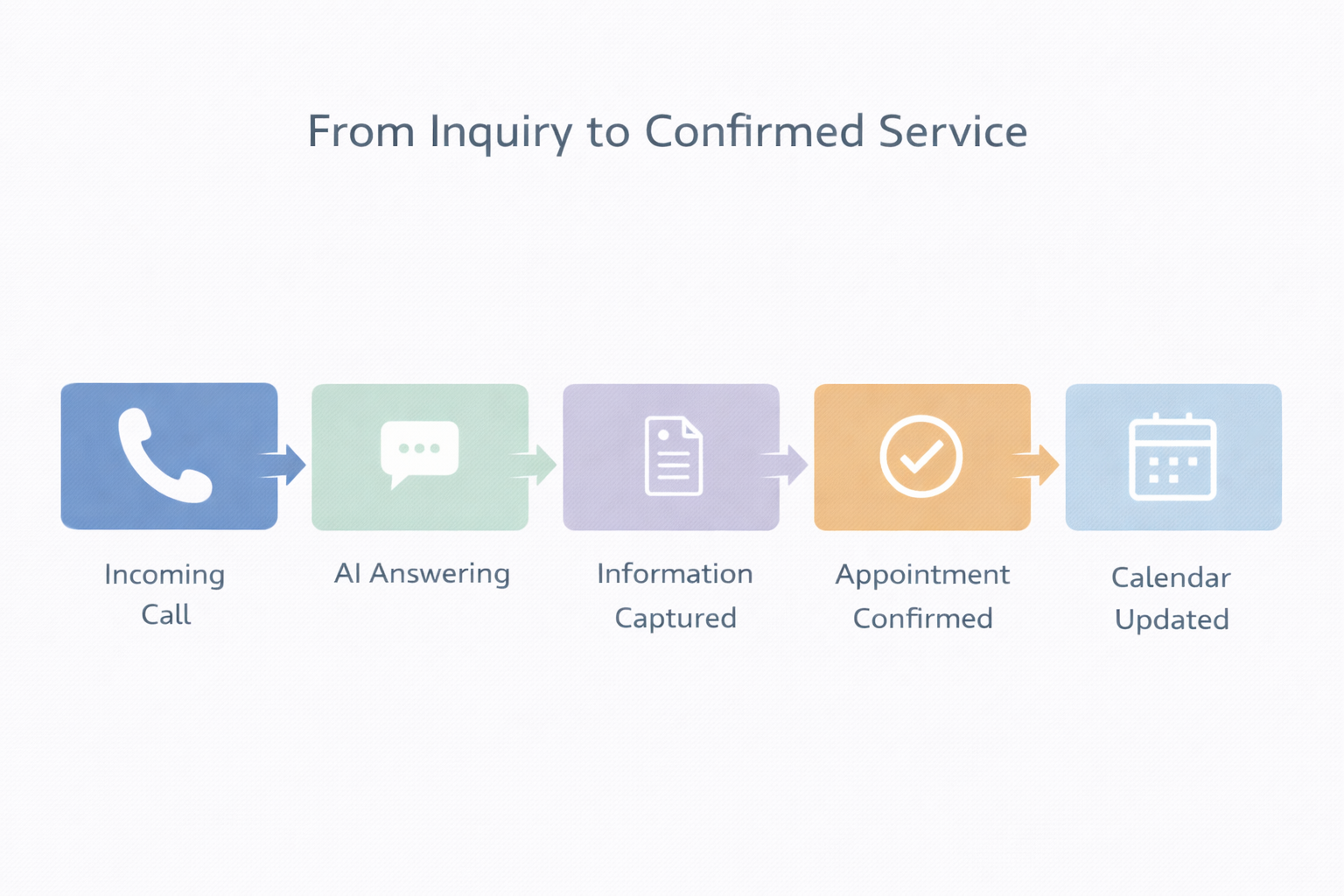
With Goodcall, your funeral home benefits from:
- AI powered call answering that ensures every inquiry is handled, including after hours and during peak periods
- Real-time appointment booking during live calls, reducing administrative delay
- Structured call logging that feeds directly into your scheduling workflow
- Missed call recovery through automated SMS follow up with clear next steps
- Integration with funeral home CRM software to eliminate duplicate data entry
- Consistent intake capture during seasonal demand spikes or temporary staff shortages
Most traditional scheduling systems activate after a meeting is entered. Goodcall ensures each inquiry reaches your scheduling system in the first place.
For funeral homes where phone intake represents a significant share of business, this distinction directly affects operational stability and revenue protection.
Instead of separating call answering from scheduling coordination, Goodcall unifies them into a single structured system.
Start a free trial to evaluate how Goodcall strengthens both intake reliability and appointment coordination within one platform.
Best Integrations for Funeral Home Appointment Scheduling Software
To maximize operational value, scheduling platforms should integrate with:
- Funeral home CRM software for unified case management
- Accounting systems for automated billing alignment
- Digital memorial platforms for coordinated service timing
- Cemetery and crematory management tools for resource synchronization
- Secure communication systems for family updates
Integration prevents scheduling from operating in isolation and supports coordinated workflows across systems.
Final Thoughts
Funeral home appointment scheduling software introduces structured discipline into environments where precision and professionalism are essential.
The right system reduces scheduling conflicts, improves coordination, strengthens intake capture, and supports long term scalability.
When call handling and appointment capture are equally critical, selecting a solution that extends beyond calendar management becomes strategically relevant.
Operational reliability protects community trust over time.